
Set up and update your hotel’s data
Import rooms, room types, room attendants and users from a simple spreadsheet, exported from Excel for example,, during setup and in daily use. Reduce manual entry of your property’s data.
An app for reception, the head housekeeper and management
The tool suggests. You decide.
A check-in to approve, lost property, an extra ordered, rooms to assign and inspect: everything that matters today fits on one screen. From reception to the floors, you see priorities, share out the work and follow progress — without chasing information.
Request a demoFour everyday situations. Try them below.
Front desk
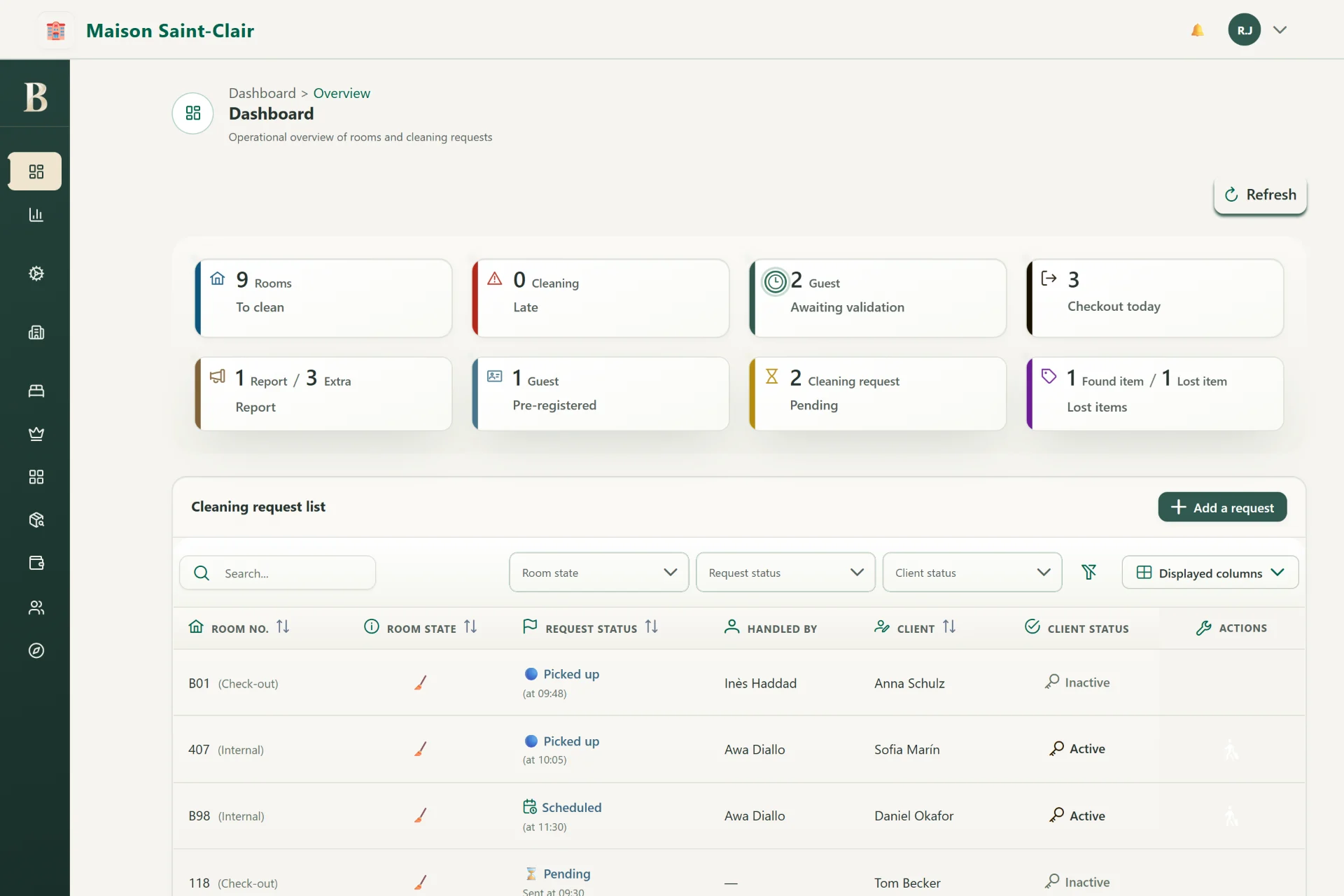
The front desk dashboard brings together what is waiting: arrivals to validate, today’s departures, issues, extras and found items. Below, room by room, where housekeeping stands and who is on it.
Your extras become revenue: ordered from the guest’s phone, added to the bill, none forgotten.
Keep found items and reported losses together to follow searches and returns.
Everyone accesses what they need, nothing more. Sensitive operations are logged.
Belvayo Office
Organise work from your office and keep everyone focused on the same priorities. Front desk teams, managers and staff have the information they need to act, without having to meet in person.
Two moments in the day, in 3D. Pick one.
The manager starts automatic room assignment from their office. Each staff member receives their rooms on their tablet, wherever they are: the day can begin without a team gathering or paper handouts.
An illustration of how Belvayo Office works.
For the hotel
Explore what you can do with Belvayo Office. Available features depend on your Essentiel, Pro or Prestige plan; the comparison shows what is included.
Check-ins to approve, today’s departures, open requests and reports, lost property, rooms to prepare or inspect.
The state of your hotel on one screen.
The guest has checked in online: reception reviews the details and approves the arrival. At departure, it finds the stay’s extras and records the check-out.
Less typing, less waiting at the desk.
Where each room stands, slot by slot, and each attendant’s round in the order they will do it: departures, stayovers, arrivals.
The whole day upstairs, readable from the front desk.
Additional or priority requests, problems and missing items reported by guests: assign them and follow them through.
No request falls through the cracks.
Keep track of additional services associated with each stay.
Ordered extras make it onto the bill, every time.
Keep found items and reported losses together to follow searches and returns.
A found item no longer gets lost between shifts.
Gather everything related to a complaint and coordinate the team’s response.
A fast, consistent answer, whoever the guest talks to.
Prepare assignments yourself or start from a suggestion. Adjust rooms and workloads before approving.
A shared schedule that stays under your control.
The head housekeeper and room attendants track rooms to inspect, issues found and redos.
Your standards, upheld every day.
Room attendants, profiles, skills, availability and schedules.
The right room for the right person, rather than the first available.
Catalogue, photo, schedules, target audience, level and weekly recurrence.
Enter the programme once and display it everywhere.
Each room attendant’s activity, the quality of service, workload balance across the team and a complete task history.
Information for decisions, beyond observation.
Set up your property’s information, opening hours and services.
Your commercial policy, applied automatically.
Give each team member access suited to their role and review the history of sensitive actions.
Everyone sees what concerns them; sensitive actions stay logged.
Each hotel keeps its own data, rules and teams separate.
As suitable for a group as for an independent hotel.
Already have a PMS?
Belvayo Office organises your team’s work.
Your PMS remains your system for reservations and billing; Belvayo does not connect to it directly. With Pro and Prestige, your hotel exports room statuses from the PMS and imports them into Belvayo Office, manually or automatically once configured. The imported data informs suggested room assignments, which the head housekeeper can adjust and approve.
There is no two-way synchronisation: changes made in Belvayo are not sent back to your PMS, and room statuses are only as current as the files your hotel provides. We agree on the import method and frequency during setup.
Import rooms, room types, room attendants and users from a simple spreadsheet, exported from Excel for example,, during setup and in daily use. Reduce manual entry of your property’s data.
With Pro and Prestige, a room-status export from your PMS feeds automatic room assignment. The proposed allocation can also use data already available in Belvayo Stay.
Your hotel provides an export
Export room statuses from your PMS: clean or needing cleaning, stayover or check-out. Your hotel provides this file for import.
You choose how to import
Your head housekeeper can import the file on demand or let automatic import take over.
You prepare room assignments
The imported information is used to propose the room allocation. You remain in control of how work is allocated.
Let’s make it practical
Where do requests get lost? How many calls go between reception and the floors every morning? Tell us about your day: we’ll show you, on your own case, what Belvayo would change.